

Services and security
Static and backup routes
How a router chooses where to send a packet, the routes you write, the default route, and the backup route that takes over when a line is down.
A router decides where to send a packet by looking its destination up in a table. In PixelCake the table is made of the networks the router is attached to, the routes you write, and a default route for everything else. When two routes lead to the same network, the first is used and the second waits as a backup.
The routing table
Every router and every firewall has a routing table, and the engine reads it each time a packet reaches one of them. A PC has one too, but no route can be written on it: its rows are the network and the gateway of each of its network cards (Addresses and gateways), and show routes prints them. The rows of a table are of three kinds:
- connected: a network one of the ports of the device is in. It needs no route: giving a port an address is enough (The ports of a router).
- static: a route you wrote, with a network and a next hop.
- default: the route for every address that no other row fits.
When more than one row fits the destination, the most specific one wins: the one with the longest mask. A /24 comes before a /16, and both before the default route, which is /0. With the same mask, connected comes before static, and static before default.
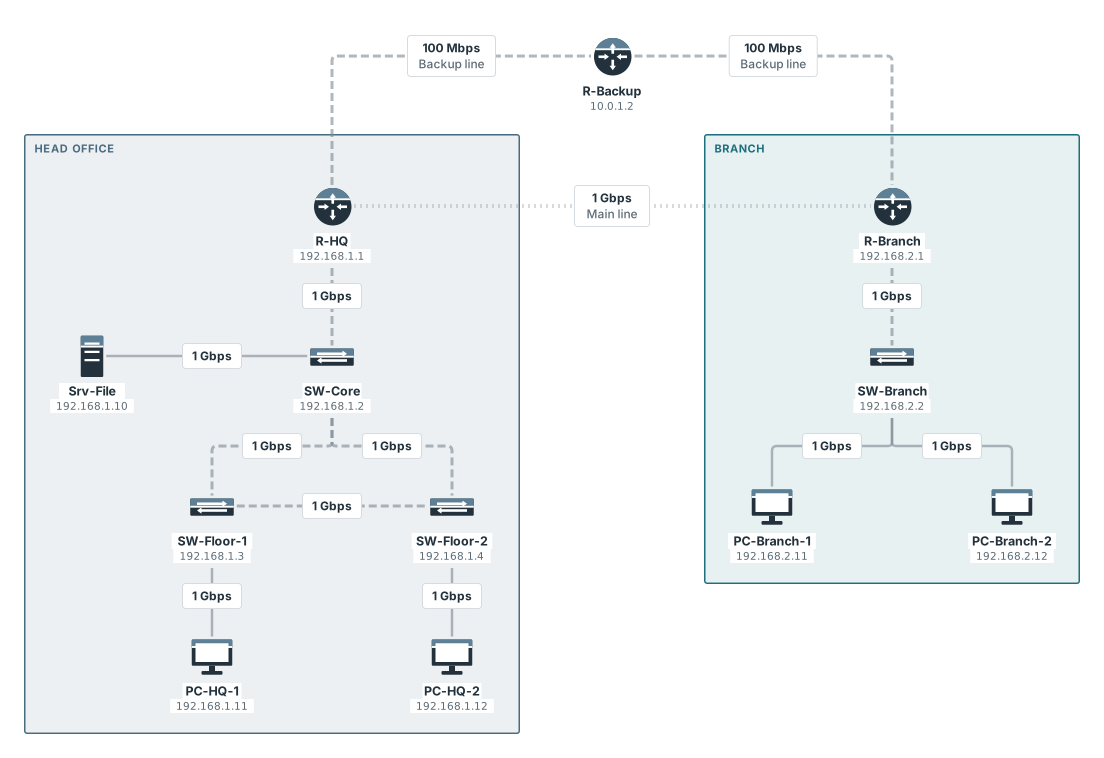
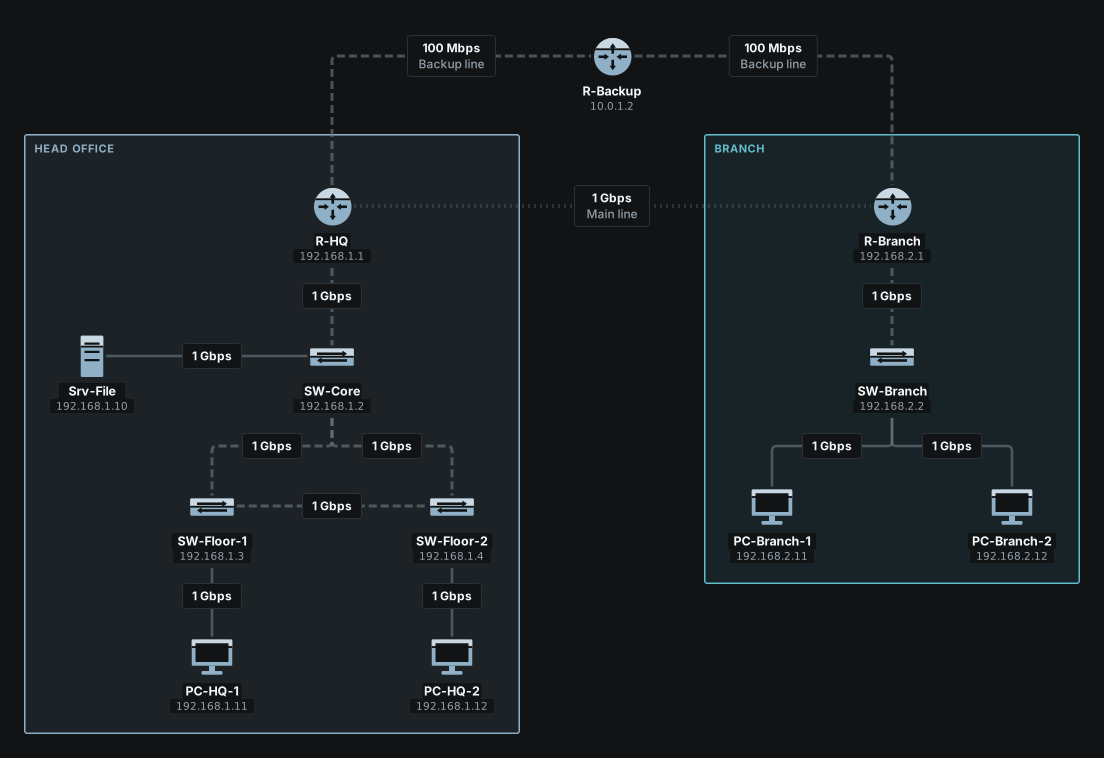
To see the table, open the window of a router or a firewall with a double click and go to the “Routes” tab. Under “Routing table” it lists the rows the engine reads: “Destination”, “Next hop”, “Interface” and “Type”, with the changes you have not saved yet. In the terminal show routes prints the same table. The sample network “Two sites: main line and backup line” has a head-office router, R-HQ, joined to the branch by a main line and, through a third router, a backup line.
The table of R-HQ:
pixelcake> show routes R-HQ
ROUTES of R-HQ
DESTINATION          VIA              OUT      KIND
10.0.0.0/30          -                port 2   connected
10.0.1.0/30          -                port 3   connected
192.168.1.0/24       -                port 1   connected
192.168.2.0/24       10.0.0.2         port 2   static
192.168.2.0/24       10.0.1.2         port 3   static, backup
The first three rows are connected networks, each with the port it is on. The last two lead to the branch network, 192.168.2.0/24, through two different next hops: the second is a backup (below).
Writing a route
A static route is a network and a next hop: the address of the router that is closer to that network. In the window of the router, in the “Routes” tab, press “Add route” under “Static routes”. Write the network and its mask in “Destination network”, for example 192.168.2.0/24, the address in “Next hop”, and if you like a reminder in “Note”. Nothing changes until you press “Save”. A row left blank is not kept, and a destination that is not a network is refused: write it as 192.168.30.0/24, or as default.
The next hop has to be in a network the router is attached to. If it is not, the row stays in the table, marked as unusable, and the router passes it over, as a real one does: the traffic for its network goes by the next route to the same network, or by the default route, and the answer says so in a note. With no other way, the packet stops at the router with that reason. The terminal warns when you write it:
pixelcake> add route 192.168.9.0/24 via 10.0.9.9 on R-HQ
R-HQ: route to 192.168.9.0/24 via 10.0.9.9 added
  warning: 10.0.9.9 is on none of the networks of R-HQ: the route cannot be used yet
pixelcake> show routes R-HQ
ROUTES of R-HQ
DESTINATION          VIA              OUT      KIND
10.0.0.0/30          -                port 2   connected
10.0.1.0/30          -                port 3   connected
192.168.1.0/24       -                port 1   connected
192.168.2.0/24       10.0.0.2         port 2   static
192.168.2.0/24       10.0.1.2         port 3   static, backup
192.168.9.0/24       10.0.9.9         ?        static  ✗ next hop on none of its networks
Routes belong on routers and firewalls. The terminal refuses add route on a PC, and says that an end device has one way out, its gateway.
A second route to a network that already has one does not add a row: it changes the next hop of the first (for a second row, see Backup routes). Here the route to the branch is taken away and written again, once with each next hop:
pixelcake> remove route 192.168.2.0/24 from R-HQ
R-HQ: 2 routes to 192.168.2.0/24 removed
pixelcake> ping PC-Branch-1 from PC-HQ-1
Pinging PC-Branch-1 (192.168.2.11) from PC-HQ-1...
Ping failed (blocked): request: R-HQ has no route to 192.168.2.11
  dropped at: R-HQ
pixelcake> add route 192.168.2.0/24 via 10.0.0.2 on R-HQ
R-HQ: route to 192.168.2.0/24 via 10.0.0.2 added
pixelcake> ping PC-Branch-1 from PC-HQ-1
Pinging PC-Branch-1 (192.168.2.11) from PC-HQ-1...
Reply from 192.168.2.11: hops=7 time=11ms
pixelcake> add route 192.168.2.0/24 via 10.0.1.2 on R-HQ
R-HQ: route to 192.168.2.0/24 now goes via 10.0.1.2 (was 10.0.0.2)
pixelcake> trace PC-Branch-1 from PC-HQ-1
Tracing route to PC-Branch-1 (192.168.2.11) from PC-HQ-1:
  1  ○ PC-HQ-1 (PC)
  2  ○ SW-Floor-1 (Switch)
  3  ○ SW-Core (Switch)
  4  ○ R-HQ (Router)  — routed: 192.168.2.0/24 via 10.0.1.2 (port 3)
  5  ○ R-Backup (Router)  — routed: 192.168.2.0/24 via 10.0.2.2 (port 2)
  6  ○ R-Branch (Router)  — routed: 192.168.2.0/24 is on port 1
  7  ○ SW-Branch (Switch)
  8  ● PC-Branch-1 (PC)
Trace complete: destination reached.
The way back
A question is an exchange: the request goes, the reply comes back, and the reply is a packet that every router on the way has to know how to route. A route in one direction is not enough.
pixelcake> remove route 192.168.1.0/24 from R-Branch
R-Branch: 2 routes to 192.168.1.0/24 removed
pixelcake> ping PC-Branch-1 from PC-HQ-1
Pinging PC-Branch-1 (192.168.2.11) from PC-HQ-1...
Ping failed (blocked): reply: R-Branch has no route to 192.168.1.11
  dropped at: R-Branch
pixelcake> add route 192.168.1.0/24 via R-HQ on R-Branch
R-Branch: route to 192.168.1.0/24 via 10.0.0.1 added
  R-HQ → 10.0.0.1
pixelcake> ping PC-Branch-1 from PC-HQ-1
Pinging PC-Branch-1 (192.168.2.11) from PC-HQ-1...
Reply from 192.168.2.11: hops=7 time=11ms
The request got to the branch. The reply could not leave R-Branch, and the reason says which router lacked the route and for which address.
The default route
A route to default takes every destination that no other row fits. It is what a router is given when it has one way out and many networks beyond it. On a router, the gateway is its default route: the “Gateway” field of the “General” tab, or set gateway of <router> to <address> in the terminal. The table marks it default (gateway). A route written in the “Routes” tab with default as its destination is a default route too, and the table marks it default.
On the sample, R-Branch reaches the head office through R-HQ. The two routes to 192.168.1.0/24 are replaced by one default route:
pixelcake> remove route 192.168.1.0/24 from R-Branch
R-Branch: 2 routes to 192.168.1.0/24 removed
pixelcake> add route default via R-HQ on R-Branch
R-Branch: route to default via 10.0.0.1 added
  R-HQ → 10.0.0.1
pixelcake> show routes R-Branch
ROUTES of R-Branch
DESTINATION          VIA              OUT      KIND
10.0.0.0/30          -                port 2   connected
10.0.2.0/30          -                port 3   connected
192.168.2.0/24       -                port 1   connected
default              10.0.0.1         port 2   default
pixelcake> trace PC-HQ-1 from PC-Branch-1
Tracing route to PC-HQ-1 (192.168.1.11) from PC-Branch-1:
  1  ○ PC-Branch-1 (PC)
  2  ○ SW-Branch (Switch)
  3  ○ R-Branch (Router)  — routed: default route via 10.0.0.1 (port 2)
  4  ○ R-HQ (Router)  — routed: 192.168.1.0/24 is on port 1
  5  ○ SW-Core (Switch)
  6  ○ SW-Floor-1 (Switch)
  7  ● PC-HQ-1 (PC)
Trace complete: destination reached.
The most specific route still wins over the default one. Here R-HQ is given a default route towards R-Backup, and the traffic for the branch keeps the route written for it:
pixelcake> add route default via R-Backup on R-HQ
R-HQ: route to default via 10.0.1.2 added
  R-Backup → 10.0.1.2
pixelcake> show routes R-HQ
ROUTES of R-HQ
DESTINATION          VIA              OUT      KIND
10.0.0.0/30          -                port 2   connected
10.0.1.0/30          -                port 3   connected
192.168.1.0/24       -                port 1   connected
192.168.2.0/24       10.0.0.2         port 2   static
192.168.2.0/24       10.0.1.2         port 3   static, backup
default              10.0.1.2         port 3   default
pixelcake> trace PC-Branch-1 from PC-HQ-1
Tracing route to PC-Branch-1 (192.168.2.11) from PC-HQ-1:
  1  ○ PC-HQ-1 (PC)
  2  ○ SW-Floor-1 (Switch)
  3  ○ SW-Core (Switch)
  4  ○ R-HQ (Router)  — routed: 192.168.2.0/24 via 10.0.0.2 (port 2)
  5  ○ R-Branch (Router)  — routed: 192.168.2.0/24 is on port 1
  6  ○ SW-Branch (Switch)
  7  ● PC-Branch-1 (PC)
Trace complete: destination reached.
Backup routes
Write two routes to the same network and the first is the one in use. The second is a backup: it takes over when the interface of the first has no working link. In the “Routes” tab, press “Add route” again, with the same “Destination network” and the other “Next hop”, under the first row. In the terminal:
pixelcake> remove route 192.168.2.0/24 from R-HQ
R-HQ: 2 routes to 192.168.2.0/24 removed
pixelcake> add route 192.168.2.0/24 via 10.0.0.2 on R-HQ
R-HQ: route to 192.168.2.0/24 via 10.0.0.2 added
pixelcake> add backup route 192.168.2.0/24 via 10.0.1.2 on R-HQ
R-HQ: backup route to 192.168.2.0/24 via 10.0.1.2 added
  used when the interface of the route via 10.0.0.2 has no working link
pixelcake> show routes R-HQ
ROUTES of R-HQ
DESTINATION          VIA              OUT      KIND
10.0.0.0/30          -                port 2   connected
10.0.1.0/30          -                port 3   connected
192.168.1.0/24       -                port 1   connected
192.168.2.0/24       10.0.0.2         port 2   static
192.168.2.0/24       10.0.1.2         port 3   static, backup
show routes marks the second row static, backup.
The backup is used when the port of the main route is switched off, or when its line is down. A line is down when the port at its other end is switched off, when the cable is cut, or when the device at the other end is down; the last two you can simulate in presentation mode, where a click on the cable and “Simulate a failure” is enough. A router then behaves like a real one that loses the carrier: it withdraws the route that leaves by that port and uses the next. The trace says so in a note, for example: R-HQ: the route 192.168.2.0/24 via 10.0.0.2 is unusable (link R-HQ–R-Branch is down), the route 192.168.2.0/24 via 10.0.1.2 is used instead.
The same goes for two default routes, and for a PC with a gateway on each of two network cards.
Switching off one end of the line is enough. The router at the other end loses the carrier too, and takes its own backup route: the request and the reply both go round by R-Backup.
pixelcake> interface 2 down on R-HQ
port 2 on R-HQ is now down
pixelcake> ping PC-Branch-1 from PC-HQ-1
Pinging PC-Branch-1 (192.168.2.11) from PC-HQ-1...
Reply from 192.168.2.11: hops=8 time=13ms
  note: reply: R-Branch: the route 192.168.1.0/24 via 10.0.0.1 is unusable (port 2 on R-HQ is disabled), the route 192.168.1.0/24 via 10.0.2.1 is used instead
From the terminal the way is easier to follow with a trace, and with the routing tables of the two routers:
pixelcake> interface 2 down on R-HQ
port 2 on R-HQ is now down
pixelcake> trace PC-Branch-1 from PC-HQ-1
Tracing route to PC-Branch-1 (192.168.2.11) from PC-HQ-1:
  1  ○ PC-HQ-1 (PC)
  2  ○ SW-Floor-1 (Switch)
  3  ○ SW-Core (Switch)
  4  ○ R-HQ (Router)  — routed: 192.168.2.0/24 via 10.0.1.2 (port 3)
  5  ○ R-Backup (Router)  — routed: 192.168.2.0/24 via 10.0.2.2 (port 2)
  6  ○ R-Branch (Router)  — routed: 192.168.2.0/24 is on port 1
  7  ○ SW-Branch (Switch)
  8  ● PC-Branch-1 (PC)
Trace complete: destination reached.
pixelcake> show routes R-HQ
ROUTES of R-HQ
DESTINATION          VIA              OUT      KIND
10.0.0.0/30          -                port 2   connected  (interface down)
10.0.1.0/30          -                port 3   connected
192.168.1.0/24       -                port 1   connected
192.168.2.0/24       10.0.0.2         port 2   static  (interface down)
192.168.2.0/24       10.0.1.2         port 3   static, backup
pixelcake> show routes R-Branch
ROUTES of R-Branch
DESTINATION          VIA              OUT      KIND
10.0.0.0/30          -                port 2   connected  (no link: port 2 on R-HQ is disabled)
10.0.2.0/30          -                port 3   connected
192.168.2.0/24       -                port 1   connected
192.168.1.0/24       10.0.0.1         port 2   static  (no link: port 2 on R-HQ is disabled)
192.168.1.0/24       10.0.2.1         port 3   static, backup
A cable cut in a presentation does the same, for both routers.
When routes disagree
Two routers can send a packet to each other, each thinking the other is closer. The engine notices a packet that comes back to a router it already went through, and stops it:
pixelcake> remove route 192.168.2.0/24 from R-HQ
R-HQ: 2 routes to 192.168.2.0/24 removed
pixelcake> remove route 192.168.2.0/24 from R-Backup
R-Backup: route to 192.168.2.0/24 removed
pixelcake> add route default via R-Backup on R-HQ
R-HQ: route to default via 10.0.1.2 added
  R-Backup → 10.0.1.2
pixelcake> add route default via R-HQ on R-Backup
R-Backup: route to default via 10.0.1.1 added
  R-HQ → 10.0.1.1
pixelcake> trace PC-Branch-1 from PC-HQ-1
Tracing route to PC-Branch-1 (192.168.2.11) from PC-HQ-1:
  1  ○ PC-HQ-1 (PC)
  2  ○ SW-Floor-1 (Switch)
  3  ○ SW-Core (Switch)
  4  ○ R-HQ (Router)  — routed: default route via 10.0.1.2 (port 3)
  5  ○ R-Backup (Router)  — routed: default route via 10.0.1.1 (port 1)
  6  ✗ R-HQ (Router)  — routing loop: the packet comes back to R-HQ
Trace failed (blocked): routing loop: the packet comes back to R-HQ
Limits
Limits
- There is no dynamic routing: no RIP, OSPF or BGP. No route is learned or announced; every route is written by hand.
- Two routes to the same network are not shared. The first is used, and the second only when the interface of the first has no working link. There are no metrics and no distances to compare.
- Only what is attached to the port counts. A next hop that goes down behind a switch does not take the interface down: the route stays and the traffic is lost there, as with any static route.
- A next hop is an address, not an interface. There are no routes through a port, no policy routing, and no sub-interfaces on a port.
- A port switched off is seen from the other end of its own cable only. With a switch between the two routers, the one beyond the switch does not notice, as with any line that goes down behind a switch.
- A failure simulated in presentation mode changes nothing in the drawing.