

Services and security
Firewall zones and rules
Security zones on the ports of a firewall, the zone policy, and the ordered rules that make exceptions to it.
A firewall in PixelCake decides on every packet that crosses it. It has two tools: the security zone of each of its ports, and a list of rules. Without rules the zones decide, with a fixed policy. A rule makes an exception to the policy, and the first rule that matches decides.
The examples on this page use the sample network “Site: VLANs, DMZ and firewall”. Its firewall, FW-Edge, has the offices behind port 1, a DMZ with a web server behind port 2, and the Internet at port 3.
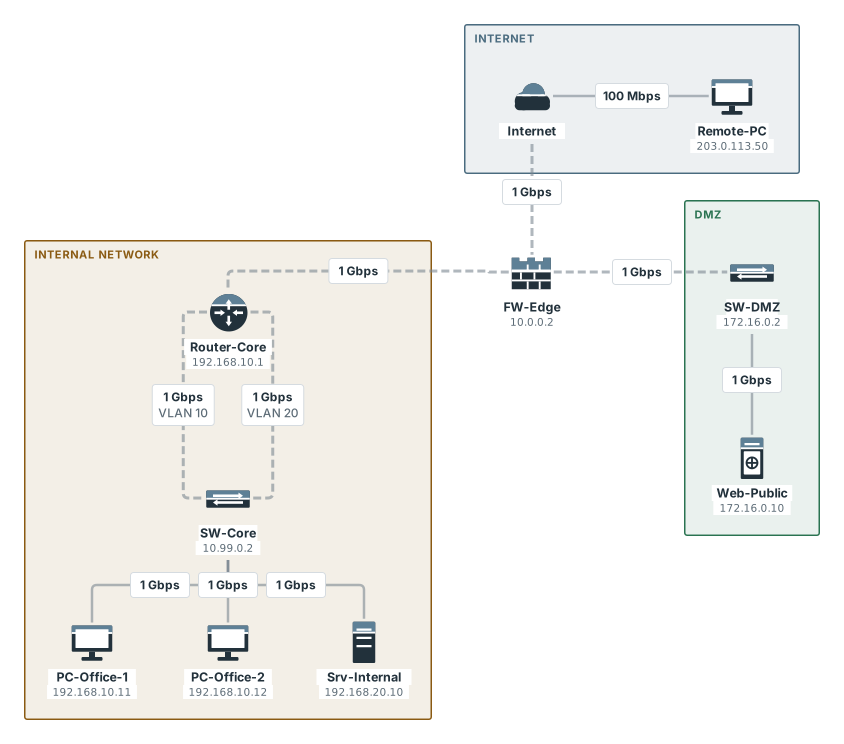
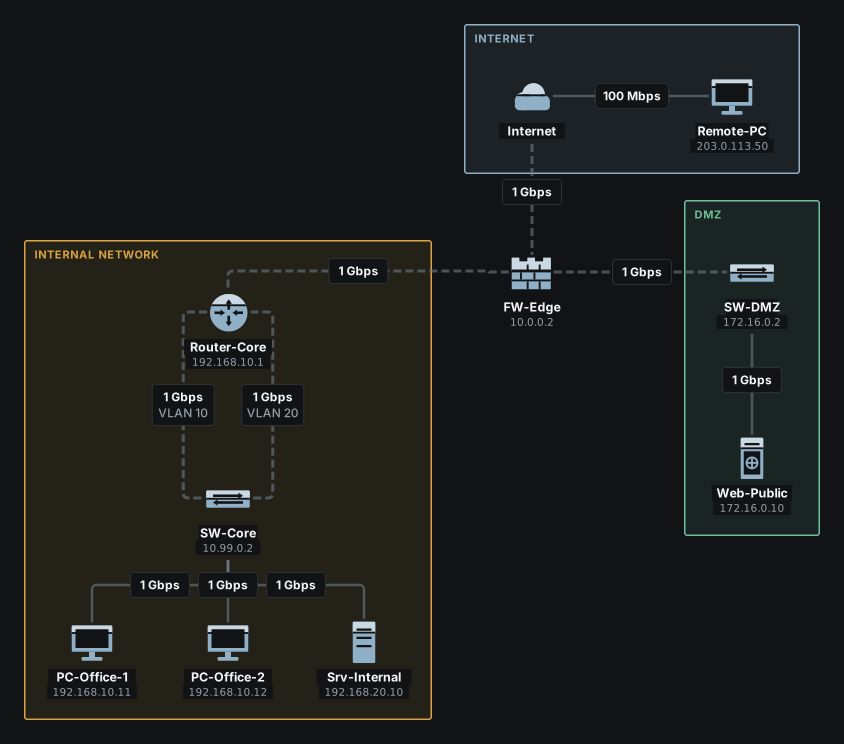
Zones
A zone says how far a network is trusted. There are three, and a port is in one of them or in none:
- trust: the network the firewall protects, the offices.
- dmz: a network of servers that are reached from outside, kept apart from the offices.
- untrust: the outside, the Internet.
The zone belongs to the port, not to the device or the cable. In the window of the firewall, open the “Ports” tab, choose the port and set “Security zone”: “None”, “Trust (trusted network)”, “Untrust (not trusted)” or “DMZ (demilitarised zone)”. Nothing changes until you press “Save”. In the terminal it is interface <n> zone <zone> on <firewall> (reference); show ports has a column for it:
pixelcake> show ports FW-Edge
PORT   STATE      MODE     VLAN       ZONE     IP               LINK
1      up         lan      -          trust    10.0.0.2         Router-Core (port 3)
2      up         dmz      -          dmz      172.16.0.1       SW-DMZ (port 8)
3      up         wan      -          untrust  203.0.113.1      Internet (eth0)
4      up         lan      -          -        -                -
The “Port mode” of a port (LAN, WAN or DMZ) is a label and decides nothing: on a firewall what counts is the security zone.
The engine needs to know which port a cable is attached to, to know which zone a packet comes in by and goes out by. A link drawn to a firewall that has zones is not attached to a port by itself: you choose the port, and with it the zone, in the window of the link. Right-click the link, choose “Edit link”, and under “Interfaces” choose the port in the list headed Interface on FW-Edge. An end that is not attached has no zone: a rule that names a zone is skipped, and the trace says so in a note.
A port with “None” as its zone is the same: no zone, no policy. A rule that names a zone is skipped there, with the same note, and what no other rule decides is allowed; the trace says no zone binding: allowed:
pixelcake> interface 2 zone none on FW-Edge
port 2 on FW-Edge is in no security zone now
pixelcake> show ports FW-Edge
PORT   STATE      MODE     VLAN       ZONE     IP               LINK
1      up         lan      -          trust    10.0.0.2         Router-Core (port 3)
2      up         dmz      -          -        172.16.0.1       SW-DMZ (port 8)
3      up         wan      -          untrust  203.0.113.1      Internet (eth0)
4      up         lan      -          -        -                -
pixelcake> browse Web-Public from PC-Office-1
Browsing Web-Public (172.16.0.10) from PC-Office-1...
  ✓ HTTP request: PC-Office-1 → Web-Public
  ✓ HTTP response: Web-Public → PC-Office-1
Page received from Web-Public
  note: HTTP request: firewall FW-Edge: no rule matches and no zone binding: allowed
  note: HTTP response: firewall FW-Edge: no rule matches and no zone binding: allowed
The zone policy
When no rule decides, the zones do. A new flow towards a more trusted zone is denied, and the rest passes:
| From | To | A new flow is |
|---|---|---|
| untrust | trust | denied |
| untrust | dmz | denied |
| dmz | trust | denied |
| every other pair, a zone to itself included | allowed |
The offices can reach the DMZ and the Internet. The DMZ cannot reach the offices, and the Internet cannot reach either. The answer says which pair it was:
pixelcake> trace Web-Public from PC-Office-1
Tracing route to Web-Public (172.16.0.10) from PC-Office-1:
  1  ○ PC-Office-1 (PC)
  2  ○ SW-Core (Switch)  — VLAN 10
  3  ○ Router-Core (Router)  — routed: default route via 10.0.0.2 (port 3)
  4  ○ FW-Edge (Firewall)  — routed: 172.16.0.0/24 is on port 2; firewall FW-Edge: no rule matches, zone policy trust → dmz allowed
  5  ○ SW-DMZ (Switch)
  6  ● Web-Public (Server)
  note: firewall FW-Edge: no rule matches, zone policy trust → dmz allowed
Trace complete: destination reached.
pixelcake> trace PC-Office-1 from Web-Public
Tracing route to PC-Office-1 (192.168.10.11) from Web-Public:
  1  ○ Web-Public (Server)
  2  ○ SW-DMZ (Switch)
  3  ✗ FW-Edge (Firewall)  — firewall FW-Edge: no rule matches, zone policy dmz → trust denied
Trace failed (blocked): firewall FW-Edge: no rule matches, zone policy dmz → trust denied
With no rules at all the reason reads firewall policy on FW-Edge: dmz → trust denied, and with rules that do not match, firewall FW-Edge: no rule matches, zone policy dmz → trust denied. The “Rules” tab says the same under “When no rule matches”.
Rules
A rule makes an exception to the policy: it lets in what the policy denies, or keeps out what it allows. In the window of the firewall go to the “Rules” tab. Under “Firewall rules”, press “Add rule” and fill in the row:
- “Action”: “Allow” or “Deny”.
- “Service”: “Ping”, “Web”, “Email”, “DNS”, or “Any”.
- “From” and “To”:
any, a zone (trust,untrust,dmz), an address, or a network such as192.168.10.0/24. A name of anything else is refused. - “Enabled”: a rule that is not ticked is skipped.
“Move up” and “Move down” change the order; “Delete rule” takes a row away. The number in the first column is the number the terminal and the traces use.
Rules are read from the top. The first enabled rule whose service, source and destination all match decides, and the rules after it are not looked at. When none matches, the policy decides. “From” is the source of the packet and “To” its destination, as the firewall sees them: a zone matches the zone of the port the packet came in by, or goes out by.
On the site sample the offices can reach the web server in the DMZ, as the policy says. Here a rule is added at the end that denies the web to the DMZ for one office PC, the one at 192.168.10.12. The other PC is not touched by it:
pixelcake> show rules FW-Edge
RULES of FW-Edge (the first that matches decides)
   1  allow web    from untrust            to 172.16.0.10
  then the zone policy: untrust → trust, untrust → dmz and dmz → trust denied, the rest allowed
  the reply to a flow it allowed passes
pixelcake> add rule deny web from 192.168.10.12 to dmz on FW-Edge
FW-Edge: rule 2 added — deny web from 192.168.10.12 to dmz
pixelcake> browse Web-Public from PC-Office-2
Browsing Web-Public (172.16.0.10) from PC-Office-2...
  ✗ HTTP request: PC-Office-2 → Web-Public
Browse failed (blocked): HTTP request: firewall FW-Edge: denied by rule 2 (deny web from 192.168.10.12 to dmz)
  dropped at: FW-Edge
pixelcake> browse Web-Public from PC-Office-1
Browsing Web-Public (172.16.0.10) from PC-Office-1...
  ✓ HTTP request: PC-Office-1 → Web-Public
  ✓ HTTP response: Web-Public → PC-Office-1
Page received from Web-Public
  note: HTTP request: firewall FW-Edge: no rule matches, zone policy trust → dmz allowed
  note: HTTP response: firewall FW-Edge: no rule matches, zone policy dmz → trust allowed (reply to an allowed flow)
PC-Office-2 is stopped by rule 2, and the answer names it. Now an exception is written above it, at position 1, for the same address:
pixelcake> add rule 1 allow web from 192.168.10.12 to 172.16.0.10 on FW-Edge
FW-Edge: rule 1 added — allow web from 192.168.10.12 to 172.16.0.10
pixelcake> show rules FW-Edge
RULES of FW-Edge (the first that matches decides)
   1  allow web    from 192.168.10.12      to 172.16.0.10
   2  allow web    from untrust            to 172.16.0.10
   3  deny  web    from 192.168.10.12      to dmz
  then the zone policy: untrust → trust, untrust → dmz and dmz → trust denied, the rest allowed
  the reply to a flow it allowed passes
pixelcake> browse Web-Public from PC-Office-2
Browsing Web-Public (172.16.0.10) from PC-Office-2...
  ✓ HTTP request: PC-Office-2 → Web-Public
  ✓ HTTP response: Web-Public → PC-Office-2
Page received from Web-Public
  note: HTTP request: firewall FW-Edge: allowed by rule 1 (allow web from 192.168.10.12 to 172.16.0.10)
  note: HTTP response: firewall FW-Edge: no rule matches, zone policy dmz → trust allowed (reply to an allowed flow)
The same address now matches rule 1 before it reaches rule 3, and the page opens. The order is the whole of it: an exception goes above the rule it is an exception to, and a rule that catches everything goes last.
The “Rules” tab warns when a rule names a zone that no port is in: such a rule never matches.
Replies
A firewall keeps state. When it allowed a request, the reply to that request passes, whatever the rules and the policy say about new flows in the other direction. Without it the reply of a server on the Internet would be a new flow towards a more trusted zone, and the policy would deny it. The note says so:
pixelcake> ping Web-Public from PC-Office-1
Pinging Web-Public (172.16.0.10) from PC-Office-1...
Reply from 172.16.0.10: hops=6 time=9ms
  note: request: firewall FW-Edge: no rule matches, zone policy trust → dmz allowed
  note: reply: firewall FW-Edge: no rule matches, zone policy dmz → trust allowed (reply to an allowed flow)
Even a rule that denies the direction does not stop the reply. Here the first rule denies everything from the DMZ to the offices, and the offices still get the page back:
pixelcake> add rule 1 deny any from dmz to trust on FW-Edge
FW-Edge: rule 1 added — deny any from dmz to trust
pixelcake> browse Web-Public from PC-Office-1
Browsing Web-Public (172.16.0.10) from PC-Office-1...
  ✓ HTTP request: PC-Office-1 → Web-Public
  ✓ HTTP response: Web-Public → PC-Office-1
Page received from Web-Public
  note: HTTP request: firewall FW-Edge: no rule matches, zone policy trust → dmz allowed
  note: HTTP response: firewall FW-Edge: reply to an allowed flow passes rule 1 (deny any from dmz to trust)
The rule is for new flows that start in the DMZ. The reply to a flow that started in the offices is not one.
Each firewall remembers only the flows it has seen itself. A reply that comes back by another way than its request, through a firewall the request did not cross, is a new flow to that firewall: its rules and its zone policy decide, as for any packet. When they deny it, the reason ends with and it never saw the request, for example reply: firewall FW-B: no rule matches, zone policy untrust → trust denied, and it never saw the request. Two firewalls side by side need the routes to send a reply back the way its request came.
The firewall itself
What is addressed to the firewall itself is not filtered. Here a rule denies everything from the Internet, and the firewall still answers a ping on its outside address:
pixelcake> add rule deny any from untrust to any on FW-Edge
FW-Edge: rule 2 added — deny any from untrust to any
pixelcake> ping 203.0.113.1 from Remote-PC
Pinging FW-Edge (203.0.113.1) from Remote-PC...
Reply from 203.0.113.1: hops=3 time=3ms
  note: request: Internet is not simulated: traffic assumed to pass
  note: reply: Internet is not simulated: traffic assumed to pass
Only what goes through is judged by the rules. The administration of the firewall is not simulated.
Rules on a router
A router can carry rules too: its access list. The window of a router has the same “Rules” tab, with the same editor, and the terminal takes add rule and show rules on a router as on a firewall. The rules are read the same way, top to bottom, on what the router routes. A router has no zones, so a rule names addresses and networks.
What no rule matches is decided as on real routers: the list ends with an implicit deny. A router with no rules lets everything through; as soon as it has one that is enabled, what no rule allows is blocked, and the reason says so: router Router-Core: no rule allows it. A router whose rules are all disabled lets everything through again. The reply to a flow the router allowed passes, as on a firewall. Under “When no rule matches” the “Rules” tab of a router says the same, and show rules ends with the implicit deny:
pixelcake> add rule deny ping from any to Srv-Internal on Router-Core
Router-Core: rule 1 added — deny ping from any to 192.168.20.10
  Srv-Internal → 192.168.20.10
  from now on Router-Core blocks what no rule allows
pixelcake> ping Srv-Internal from PC-Office-1
Pinging Srv-Internal (192.168.20.10) from PC-Office-1...
Ping failed (blocked): request: router Router-Core: denied by rule 1 (deny ping from any to 192.168.20.10)
  dropped at: Router-Core
pixelcake> browse Srv-Internal from PC-Office-1
Browsing Srv-Internal (192.168.20.10) from PC-Office-1...
  ✗ HTTP request: PC-Office-1 → Srv-Internal
Browse failed (blocked): HTTP request: router Router-Core: no rule allows it
  dropped at: Router-Core
The ping is stopped by rule 1, and the page by the implicit deny: no rule allows it. A rule that allows what the offices send opens the rest, and the response of the server comes back as the reply of a flow the router allowed:
pixelcake> add rule allow any from 192.168.10.0/24 to any on Router-Core
Router-Core: rule 2 added — allow any from 192.168.10.0/24 to any
pixelcake> browse Srv-Internal from PC-Office-1
Browsing Srv-Internal (192.168.20.10) from PC-Office-1...
  ✓ HTTP request: PC-Office-1 → Srv-Internal
  ✓ HTTP response: Srv-Internal → PC-Office-1
Page received from Srv-Internal
  note: HTTP request: router Router-Core: allowed by rule 2 (allow any from 192.168.10.0/24 to any)
  note: HTTP response: router Router-Core: no rule matches, allowed as the reply to an allowed flow
pixelcake> show rules Router-Core
RULES of Router-Core (the first that matches decides)
   1  deny  ping   from any                to 192.168.20.10
   2  allow any    from 192.168.10.0/24    to any
      deny  any    from any                to any  (implicit: what no rule allows)
  the reply to a flow it allowed passes
pixelcake> remove rule 2 from Router-Core
Router-Core: rule 2 removed — allow any from 192.168.10.0/24 to any
pixelcake> remove rule 1 from Router-Core
Router-Core: rule 1 removed — deny ping from any to 192.168.20.10
  Router-Core has no rules left: it lets everything through
Rule 1 still comes first: the ping stays denied, and everything else from the offices passes. Once the last rule is removed the router filters nothing.
Limits
Limits
- A rule has four services: ping, web, email and DNS, or any of them. There are no port numbers and no protocols: a rule cannot tell one web port from another, or allow SSH.
- Three zones, with names that are fixed: trust, untrust and dmz. There are no other zones and no custom policy between zones; the rules are the only exceptions.
- A firewall remembers the flows it let through for as long as one question lasts: there is no table of connections to look at, no timeout and no limit on how many are open.
- What is addressed to the firewall itself is not filtered.
- The packet is looked at by address and by zone only. There is no inspection of what it carries, no logging, no rate limit and no schedule. The IPS/IDS option of a port is documentation: the engine does not simulate it.
- A link end that is not attached to a port has no zone, and neither has a port whose zone is “None”. The rules that name a zone are skipped there, and the trace says which of the two it is; the traffic is not stopped for it.
- The rules of a router keep state, as those of a firewall: the reply to a flow the router allowed passes. A plain access list on a real router does not, and needs a rule for the replies too.